
**mesh_lin_rectangle#
Description#
This command is used to quickly generate a 2D ruled linear mesh of a rectangle. See also the quadratic version mesh_quad_rectangle.
Syntax#
**mesh_lin_rectangle
\(~\,\) *ncutx nx
\(~\,\) *ncuty ny
\(~\,\) *sizex length_x
\(~\,\) *sizey length_y
*ncutx,*ncutyNumber of subdivisions along the \(x\) and \(y\) axes.
*sizex,*sizeyLength of the box in each direction.
Example#
****mesher
 ***mesh rect.geo
  **mesh_lin_rectangle
   *ncutx 10
   *ncuty 200
   *sizex 1.
   *sizey 20.
****return
**mesh_quad_rectangle#
Description#
This command is used to quickly generate a 2D ruled quadratic mesh of a rectangle. It shares its syntax with mesh_lin_rectangle with some additional options.
Syntax#
**mesh_quad_rectangle
\(~\,\) *ncutx nx
\(~\,\) *ncuty ny
\(~\,\) *sizex length_x
\(~\,\) *sizey length_y
\(~\,\) [ *no_sets]
\(~\,\) [ *c2d6]
*no_setsThe faces, edges and corner NSETS are not generated.
*c2d6Change element type to c2d6. By default: c2d8.
Example#
The following example creates a mesh of a \(175\times 3\) mm plate (circular shape, in axisymmetric formulation), with square \(0.1 \times 0.1\) mm elements.
****mesher
 ***mesh regular_quad_plate.geo

  **mesh_quad_rectangle
   *sizex 175.0e-3
   *sizey 3.0e-3
   *ncutx 1750
   *ncuty 30

  **translate *y 0.11
  **to_cax

  **rename_set
   *nsets
    x0   axis
    x1   tip
    y0   bottom
    y1   top
    x0y0 Pbot0
    x1y0 Pbot1750
    x0y1 Ptop0
    x1y1 Ptop1750

  **bset tip    *use_nset tip
  **bset top    *use_nset top
  **bset bottom *use_nset bottom
  **bset_align  *bsets ALL

****return
**mesh_quadrangle#
Description#
This mesher creates the mesh of a quadrangle using quadrilateral elements.
Syntax#
**mesh_quadrangle
\(~\,\) *pointA POINTA
\(~\,\) *pointB POINTB
\(~\,\) *pointC POINTC
\(~\,\) *pointD POINTD
[ *ncut_AB cut_AB ]
[ *ncut_BC cut_BC ]
[ *prog_AB prog_AB ]
[ *prog_BC prog_BC ]
[ *prog_DC prog_DC ]
[ *prog_AD prog_AD ]
[ *radius_AB r_ab ]
[ *radius_CD r_cd ]
[ *no_sets ]
[ *quad ]
*pointA,*pointB,*pointC, and*pointDare the vertices of the rectangle.
*ncut_AB(resp.*ncut_BC)the number of subdivisions along AB (resp. BC).
*prog_AB,*prog_BC,*prog_DC, and*prog_ADThe geometrical progression of the mesh along AB, BC, DC, and AD, respectively.
*radius_ABand*radius_CDThe radius of curvature of sides AB and CD.
*no_setsTo prevent the creation of node sets (vertices and edges).
*quadTo output a quadratic mesh.
Example#
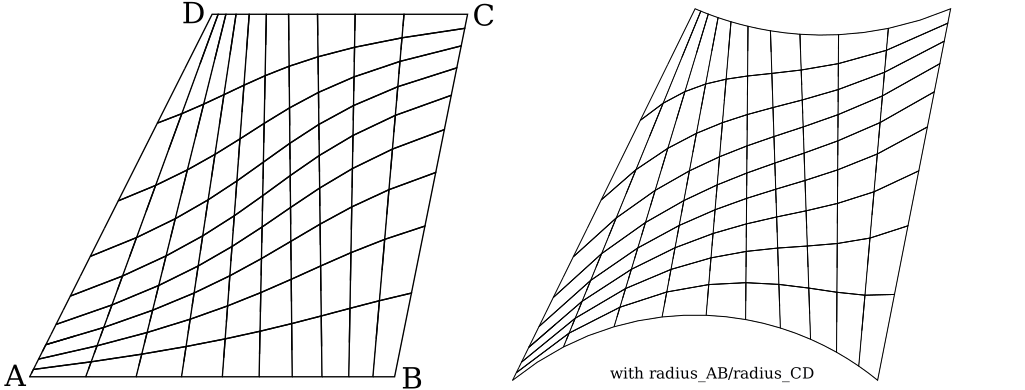
**mesh_quadrangle
 *pointA (0. 0.)
 *pointB (1. 0.)
 *pointC (1.2 1.)
 *pointD (0.5 1.)
 *ncut_AB 10
 *ncut_BC 9
 *prog_AB 0.9
 *prog_BC 0.8
 *prog_DC 1.3
 *prog_AD 1.4
 *radius_AB 0.8
 *radius_CD 0.9
 *quad