
Torsion of bars (elastoplasticity)#
Highlights
This tutorial explores the following topics:
mesh of a 3D geometry (cylinder) using Zmaster interface GUI and meshers
apply the rotation of node set
compute the torsion moment
Problem specification#
In this tutorial, we will study the evolution of plasticity in a cylindrical bar. First, we will study an elastic bar. Then, an elastoplastic bar with perfect and hardening plasticity will be considered.
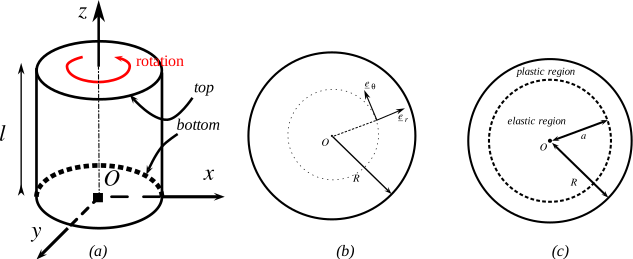
Fig. 61 (a) torsion of a cylinder with height \(l\) and radius \(R\) (b) cylindrical coordinate frame (c) elastic/plastic regions after yield.#
Analytical solutions#
Isotropic elasticity#
Displacement, strain, and stress fields in the case of small strain isotropic elasticity are given by
where \(\mu=\dfrac{E}{2(1+\nu)}\) is the shear modulus, and \(\alpha\) is the applied rotation angle per length. The applied torque moment is given by
Elastoplasticity#
The total strain is split in two parts: the elastic strain related to the stress through the Hooke’s law and the plastic strain
Consider a von Mises plasticity model. The yield functions for perfect plasticity, isotropic hardening, and kinematic hardening models are expressed as:
For the sake of simplicity, we consider linear hardening models, with back stress \(\ten X=\dfrac{2C}{3}\ten \varepsilon^p\), and \(R(p)=H p\) (where \(p\) denotes the cumulative plastic strain).
The applied loading consists of a positive rotation followed by unloading in the reverse direction.
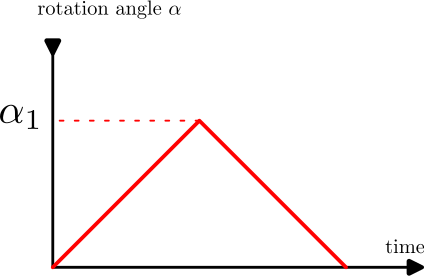
Loading
The plasticity occurs when \(J_2(\ten \sigma)=\sigma_0\), where \(J_2(\ten \sigma)=\sqrt{3}\sigma_{\theta z}\) is the von Mises invariant, and \(\sigma_0\) is the yield stress. The plasticity will first appear at \(r=R\) where the value of \(\sigma_{\theta z}\) is at its maximum. Then, the rotation angle per length \(\alpha_{yield}\), and the torque \(\mathcal{C}_{yield}\) that can be applied before yield are:
The radius of the elastic zone is given by \(a=\dfrac{\sigma_0}{\sqrt{3}\mu\alpha}\)
The stress \(\sigma_{\theta z}\) is given by
where \(\mathcal{H}(p)\) is the hardening function (isotropic or kinematic).
The cumulative plastic strain is given by
perfect plasticity: \(p=\dfrac{\alpha}{\sqrt{3}}(r-a)\)
linear isotropic hardening: \(p=\dfrac{\sqrt{3}\alpha (r-a)}{3+H/\mu}\)
linear kinematic hardening: \(p=\dfrac{\sqrt{3}\alpha (r-a)}{3+C/\mu}\)
The torque, taking into account stresses in both elastic and plastic zones, is given by
The limit value of the torque (when plasticity reaches the axis) is given by
Perfect plasticity
\[\mathcal{C}_\infty = 2\pi R^3\dfrac{\sigma_0}{3\sqrt{3}}\]Linear isotropic/kinematic hardening: the torque has no limit due to stress continuously increasing with plastic strain.
Unloading
Now, we consider the case of unloading (the rotation angle \(\alpha_2=\alpha_1-\alpha\) will be applied in the opposite direction). The stress in elastic and plastic regions is given by
The unloading will be elastic until a value of \(\alpha^u_{yield}\) is applied. The yield will appear at \(r=R\), and
perfect plasticity: \(\alpha^u_{yield}=\dfrac{2\sigma_0}{\sqrt{3}\mu R}\),
isotropic hardening: \(\alpha^u_{yield}=\dfrac{2(\sigma_0+Hp_1)}{\sqrt{3}\mu R}\), with \(p_1\) is the cumulative plastic strain before unloading.
linear kinematic hardening: \(\alpha^u_{yield}=\dfrac{2\sigma_0}{\sqrt{3}\mu R}\)
When \(\alpha_2=\alpha_1\), the residual stresses are expressed as
where \(b=\dfrac{2\sigma_0}{\sqrt{3}\mu\alpha_2}\). The cumulative plastic strain in the region \(b\leq r\leq R\) can be written as
perfect plasticity: \(p(r)=p_1(r)+\dfrac{\alpha r}{\sqrt{3}}-\dfrac{2\sigma_0}{3\mu}\)
isotropic hardening: \(p(r)=p_1(r)+\dfrac{\sqrt{3}\mu\alpha r - (2\sigma_0+Hp_1)}{3\mu+\sqrt{3}H}\)
linear kinematic hardening: \(p(r)=p_1(r)+\dfrac{\sqrt{3}\mu\alpha r - 2\sigma_0}{3\mu+\sqrt{3}C}\)
Mesh generation#
Note
To create the mesh, execute
> Zrun -m mesh_cylinder.inp
The following steps will guide you through creating the geometry files from scratch.
First the mesh of a quarter of a disk is created (disk_quart.mast) using Zmaster interface.
Create points
 \(\longrightarrow\)
#Points   x        y        z
point0    0.       0.       0.
point1    1.       0.       0.
point2    0.       1.       0.
point3    0.5      0.       0.
point4    0.       5.       0.
point5    0.425    0.425    0.
point6    0.707107 0.707107 0.
Create lines
 and arcs
Define the number of nodes at each edge

Create ruled domains

Save the project
.mastfile. (File \(\longrightarrow\) Save)
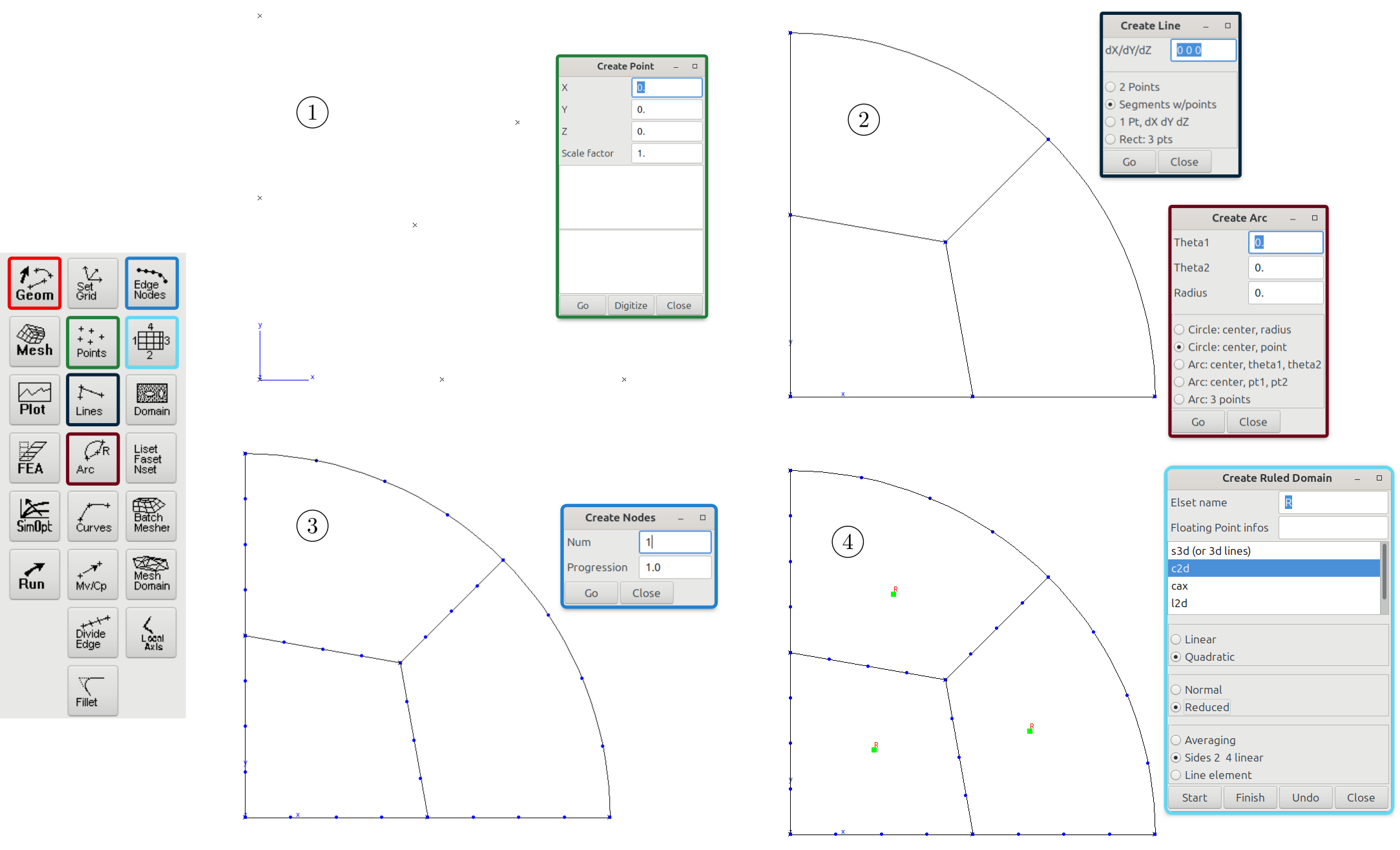
To obtain the mesh of the cylinder:
Create the mesh of the quarter disk
fourth.geoffromdisk_quart.mast.Create the symmetrical part of the disk quarter using
**symmetryof typelinetransformer, and use a**unionto get the half of a disk.Create the symmetrical part of the disk half using
**symmetryof typelinetransformer, and use a**unionto get the mesh of a full 2D disk.Extrude the mesh of 2D disk to obtain the mesh of the cylinder. After this operation, the mesh will be made of
c3d20relements. The interpolation is quadratic because the ruled domains (disk_quart.mast) are made of quadratic elements, and the reduced integration is set to*reduced.Define some useful boundary sets:
top,bottom,X. In this case, it is very convenient to use simple functions. For example, the fasettopis defined as the faces that has a coordinatez>1.999. The lisetXwill be used to plot some quantities along the x-axis.
Hint
The command
***shellis used here in order to clean up intermediate meshes (fourth.geof,half.geof,planar.geof, anddisk_quart.geof).After
***shell, ensure the commands are compatible with the operating system (e.g.rmfor Linux, anddelfor Windows.
% mesh_cylinder.inp file
****mesher
 ***mesh fourth.geof
  **open_mast disk_quart.mast

 ***mesh half.geof
  **open fourth.geof
  **symmetry
   *type line
   *normal (-1. 0. 0.)
  **union
   *add fourth.geof
 ***mesh planar
  **open half.geof
  **symmetry
   *type line
   *normal (0. -1. -1)
  **union
   *add half.geof
 ***mesh cylinder.geof
  **open planar.geof
  **extension
   *reduced
   *distance 2.
   *num 5

  **bset top
   *function z>1.999;
  **bset bottom
   *function z<0.001;
  **bset X *function (z>1.999)*(abs(y)<0.0001)*(x>-0.001); *use_dimension 1
 ***shell rm fourth.geof half.geof planar.geof disk_quart.geof
****return
Finite element analysis#
Finite element formulation#
A small strain formulation is used as
****calcul
 ***mesh  small_deformation
  **file cylinder.geof
Global problem resolution#
***resolution                % by default, Newton methods
 **sequence 4                % 4 loading sequences
  *time  0.15 1. 1.3 2.      % time from 0. to 2.
  *increment 10              % number of increments/sequence, for elastic models use 1
  *iteration 20              % the maximum number of iterations per increment
  *ratio 0.01                % the convergence ratio
  *algorithm p1p2p3          % use Newton-Raphson algorithm
 **automatic_time            % setup the automatic time
  *security 1.2              % increase time step by 1.2 in case of convergence
  *divergence 2. 10          % decrease time step by 2 in case of divergence
                             % maximum number of divergences is 10
  *first_dtime 1e-3          % first time step
Boundary conditions#
***bc                                 % boundary conditions
 **impose_nodal_dof                   % impose nodal degrees of freedom on node sets
   bottom U3 0.                       % set U3=0 on the node set "bottom"
   bottom U2 0.                       % set U2=0 on the node set "bottom"
   bottom U1 0.                       % set U1=0 on the node set "bottom"
 **linear_rotation                    % apply a linear rotation
   top  (0. 0. 1.) (0.,0.,2.)  2. tab % rotate the node set "top" around z-axis,
                                      % where the rotation center is (0,0,1),
                                      % by rotation = 2 degrees * tab
                                      % On "top" nset.
where the table tab is defined as
***table
 **name  tab
  *time  0. 1. 2.
  *value 0. 1. 0.
Note
linear_rotation boundary condition is a linearized version of the **rotation, and should be
used with small strain problems.
Material behavior#
***material                                  % set the material model
   *file mat_behavior                        % 'mat_behavior' should be replaced by the right file
   *integration theta_method_a 1. 1.e-10 50  % choose the integration method for
                                             % constitutive equations
Isotropic elasticity#
 % elastic_behavior file
 ***behavior gen_evp
  **elasticity isotropic
    young 200000.
    poisson 0.3
***return
Elastoplasticity#
 % elastoplastic_behavior file
 ***behavior gen_evp
  **elasticity isotropic
    young 200000.
    poisson 0.3
  **potential gen_evp ep
   *flow plasticity
   *criterion mises
   *isotropic linear
    R0 300. H 0.
***return
Post-processing#
To compute stress values in the cylindrical coordinates frame
***global_post_processing
 **file node
 **nset ALL
 **process transform_frame
  *local_frame cylindrical (0. 0. 0.) (0. 0. 1.)
  *tensor_variables sig
  *tensor_size 6
To compute the torque value, the
static_torsorpost_processing can be used:***global_post_processing **nset top **file node **process static_torsor *point (0. 0. 0.) *file static_torsor.dat % the output result is stored in this file
The torque will be stored in the 10th column of the
static_torsor.datfile.The
torquepost_processing can also be used:***global_post_processing **file node **nset top **process torque *point (0.,0., 2.) *direction (0.,0.,1.)
In this case, torque will be stored in the second column of
.postfile.
Results#
Small strain elasticity#
First, run the finite element problem and the post-processing, and launch Zmaster to visualize the results, using the following commands:
> Zrun torsion_hpp_elastic
> Zrun -pp torsion_hpp_elastic
> Zmaster torsion_hpp_elastic
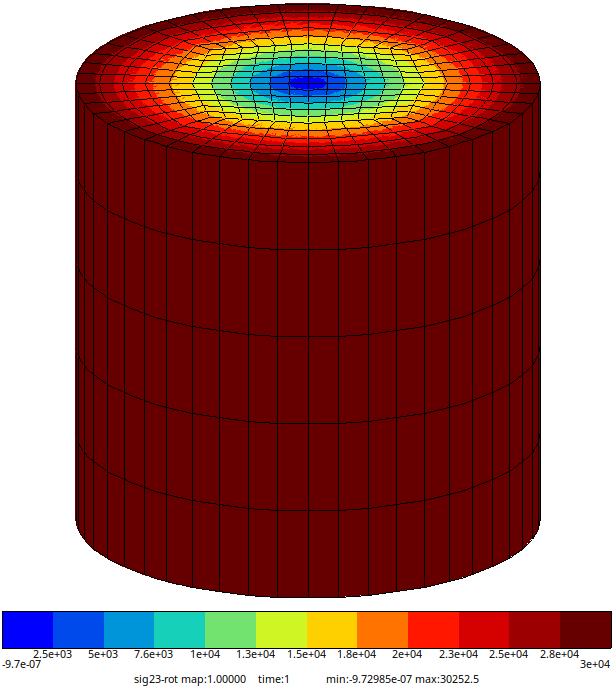
Fig. 62 Finite element solution: \(\sigma_{\theta z}\) stress (at nodes) for \(E=2\times 10^5\) MPa, \(\nu=0.3\), and \(\alpha=45^\circ/2 mm\).#
Small strain elasto-plasticity#
For brevity, we consider a perfect plastic model with \(\sigma_0=300\) MPa. The same analysis
applies to isotropic/kinematic hardening by modifying the material behavior in
torsion_hpp_plastic.inp.
Run the following commands:
> Zrun torsion_hpp_plastic
> Zrun -pp torsion_hpp_plastic
> Zmaster torsion_hpp_plastic
To plot the evolution of cumulative plastic strain on one of the outer perimeter nodes:
click on
 ,
,click on Add/Del..,
select node_vals \(\longrightarrow\) New,
set nodes to the node number (e.g. 6577 with \(x=1mm,~y=0mm,~z=2mm\)) \(\longrightarrow\) OK. Now a line node: 6577 is added below liset: … in the plot panel,
Select node: 6577, and choose variables time vs. epcum \(\longrightarrow\) Draw
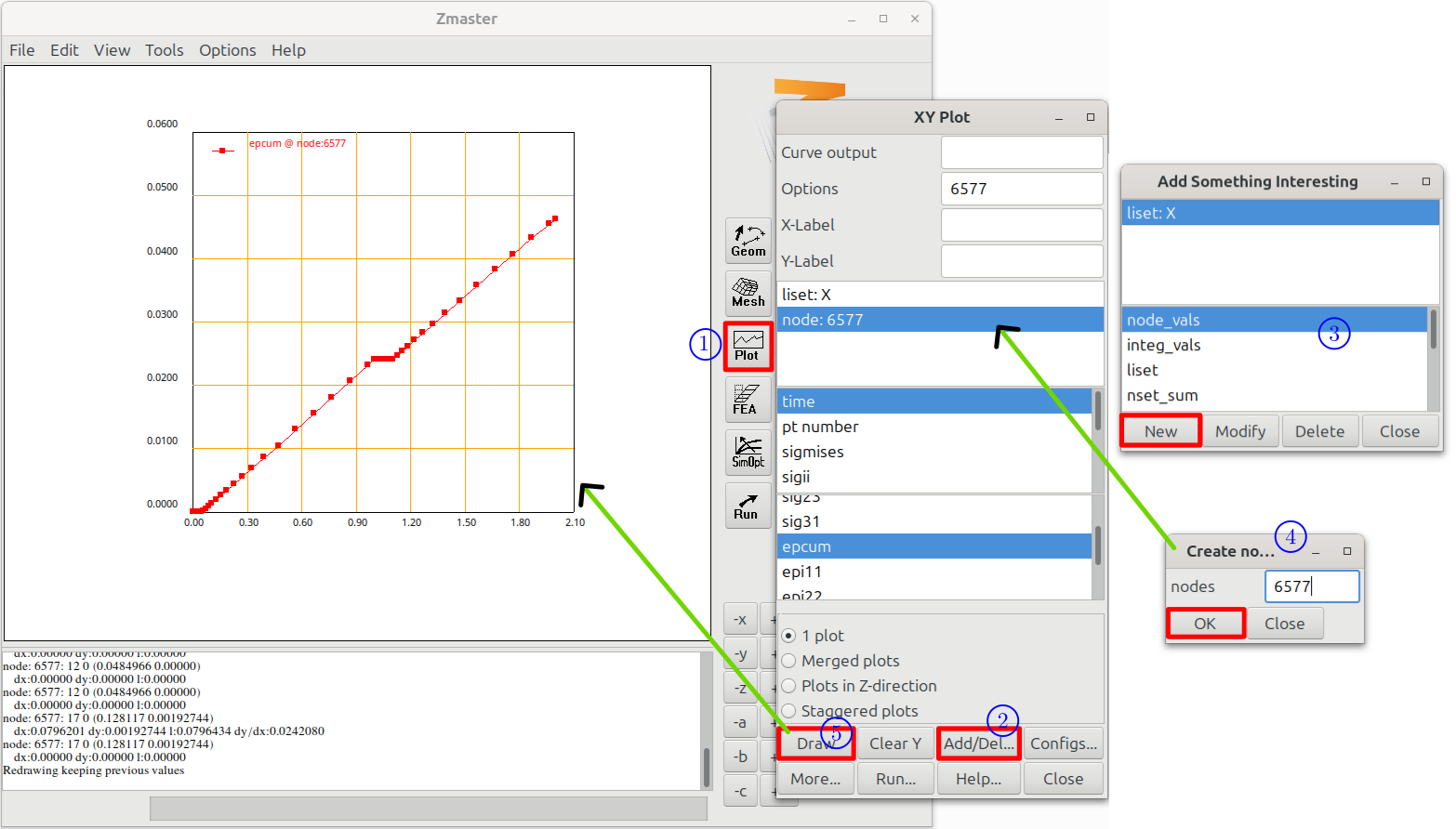
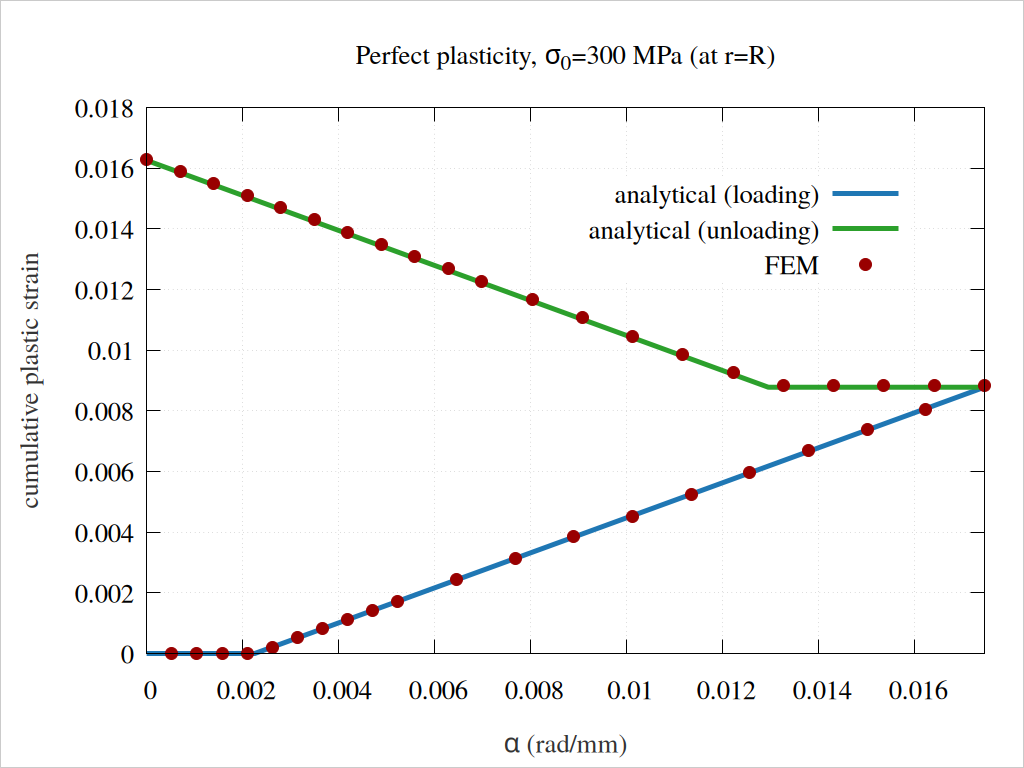
Fig. 63 The cumulative plastic strain in terms of rotation angle per length \(\alpha\).#
To visualize stress click on  , select
 sig23-rot (i.e. \(\sigma_{\theta z}\)). The last results map depicts the residual stress after complete unloading.
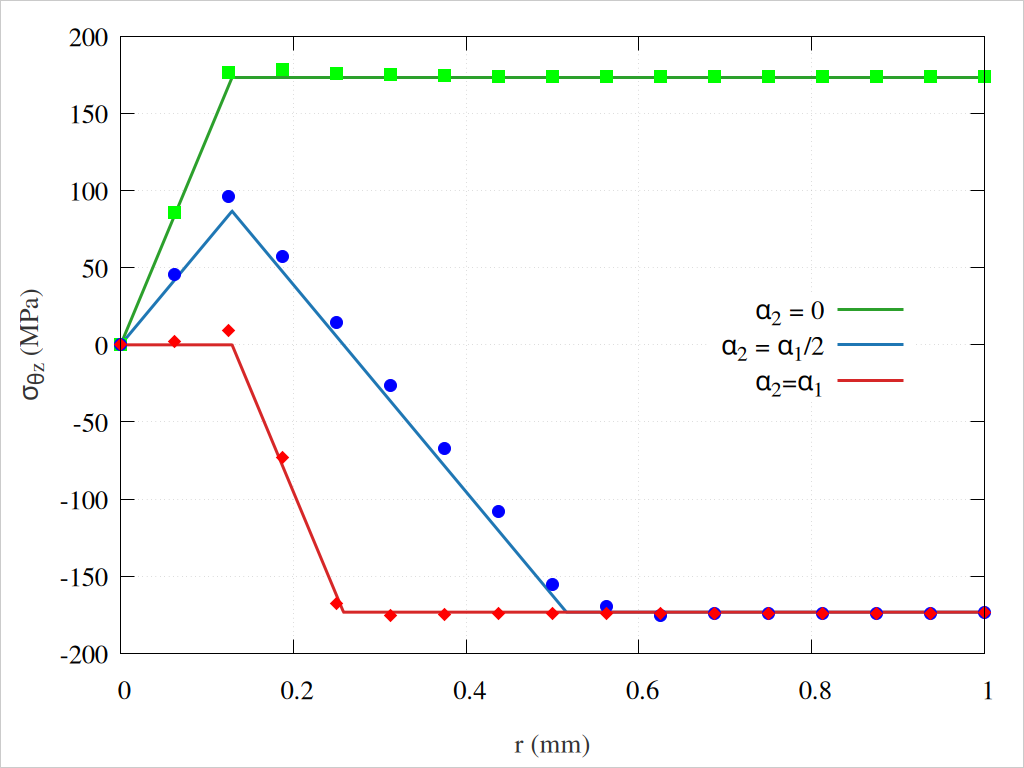
Fig. 64 The stress \(\sigma_{\theta z}\) after unloading. The solid lines represent the analytical solutions, while the marked dots correspond to FEM results. Note that FEM stress values are extrapolated to nodes.#
The figure Fig. 65 depicts the evolution of the torque in terms of the applied rotation angle \(\alpha\).
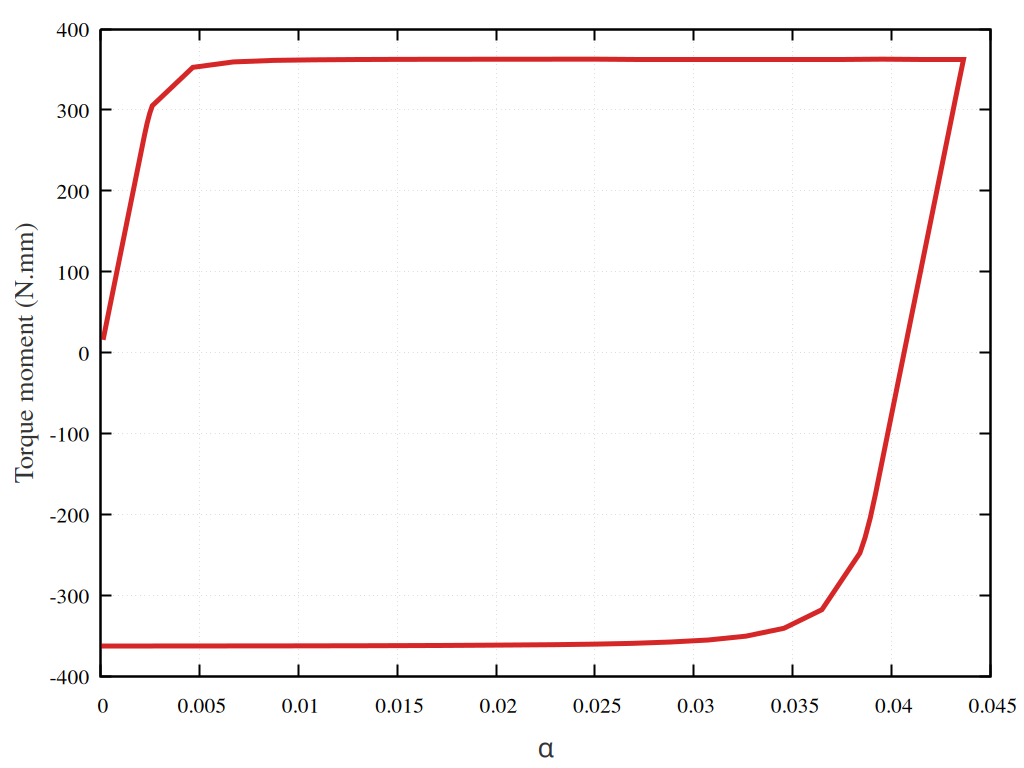
Fig. 65 evolution of the torque in terms of the applied rotation angle \(\alpha\).#
Large deformations#
Poynting effect
The Poynting effect is a nonlinear mechanical behavior frequently observed in soft solids, including rubber, gels, and biological tissues. When these materials undergo shear or torsional deformation, they either stretch or compress in the direction perpendicular to the plane of the applied shear or twist.
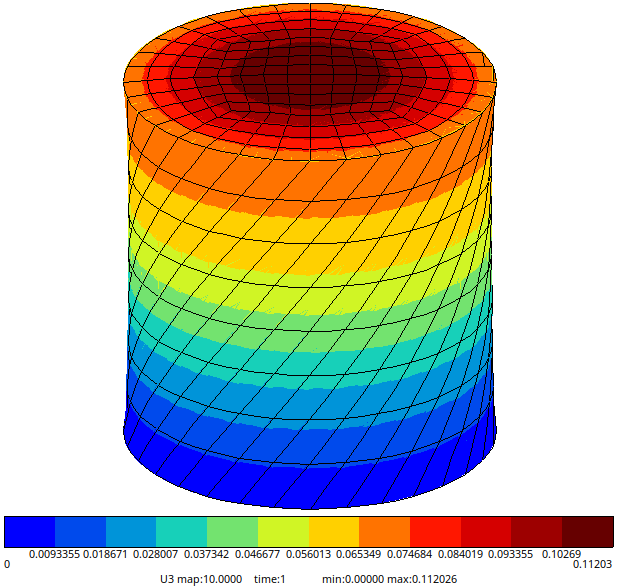
Fig. 66 The displacement \(U_3\) for an Rivlin hyperelastic model (\(\alpha=0.5\)).#
For a small strain model, the displacement in the \(x_3\)-direction will vanish.
Note
**linear_free_rotation (or **free_rotation for a finite strain model) boundary
condition should be used in order to allow displacement in the \(x_3\)-direction.
Downloads
Mesh files
Input files
Material files